The PCBA cost model provides the ability to automatically cost rigid printed circuit board assemblies (PCBAs). The major cost drivers for PCBAs are:
-
The cost of the individual components comprising the PCBA
-
The cost of assembling, testing, and performing any other processes needed to manufacture the PCBA from those components
The current release of this functionality does not cover rigid-flex or flexible circuit board assemblies, nor does it cover the design and manufacture of the boards themselves, which are considered components with a user-provided cost.
The primary use cases for apriori PCBA costing include providing:
-
Early estimates for new product introduction (NPI)
-
Quote evaluation
-
Outlier analysis
If you are an engineer designing a PCBA, you can create or modify your design and then generate and cost a BOM to check your costs immediately, allowing you to make design decisions now rather than weeks later when receiving supplier quotes.
If you work in purchasing, you can analyze your PCBA costs at a component level, and start to negotiate from a more knowledgeable position with your suppliers.
The separately-licensed PCBA cost model is somewhat different than most other aPriori process groups (other than Wire Harness): it is implemented as a Digital Factory Factory with two process groups:
-
a “user guided” process group containing an aPriori-configured Component Library that provides cost information for all PCBA-related parts used by your company
-
a PCBA assembly process group defining all of the processes needed to create a PCBA from its constituent components
You do not really need to be concerned with this architectural detail, since aPriori configures the PCBA cost model specifically for your company, and provides an easy-to-use interface to walk you through the costing process. But if you are an experienced aPriori user who wants to understand how the PCBA cost model works, here is some more information.
The reason for this approach is that even though PCBAs are considered a type of assembly, geometric cost drivers (GCDs) are not available the same way they would be for CAD model-based components. Instead, aPriori extracts cost driver information from the BOM describing the elements making up your PCBA. This information is augmented with user-guided data such as the purchase price of the board itself or the selection of optional routings, and with component library information. Most components will be off-the-shelf parts, but we know that many companies specify internal part numbers rather than manufacturer or distributor part numbers. To associate information from the tables to the purchased component information, aPriori Professional Services first maps your internal part numbers to manufacturer or distributor part numbers in a Component Library in the Digital Factory Factory.
This chapter covers day-to-day costing use operations and assumes that aPriori Professional Services has worked with your Administrators to set up and configure this cost model, including the Component Library. See the aPriori Professional User Guide System Administration Guide and Digital Factory Administration Guide for more information about configuration and maintenance of the PCBA environment.
General Process
PCBAs are assemblies that consist of mostly purchased components with a variety of assembly and testing processes that may be required to complete the end product.
Routings
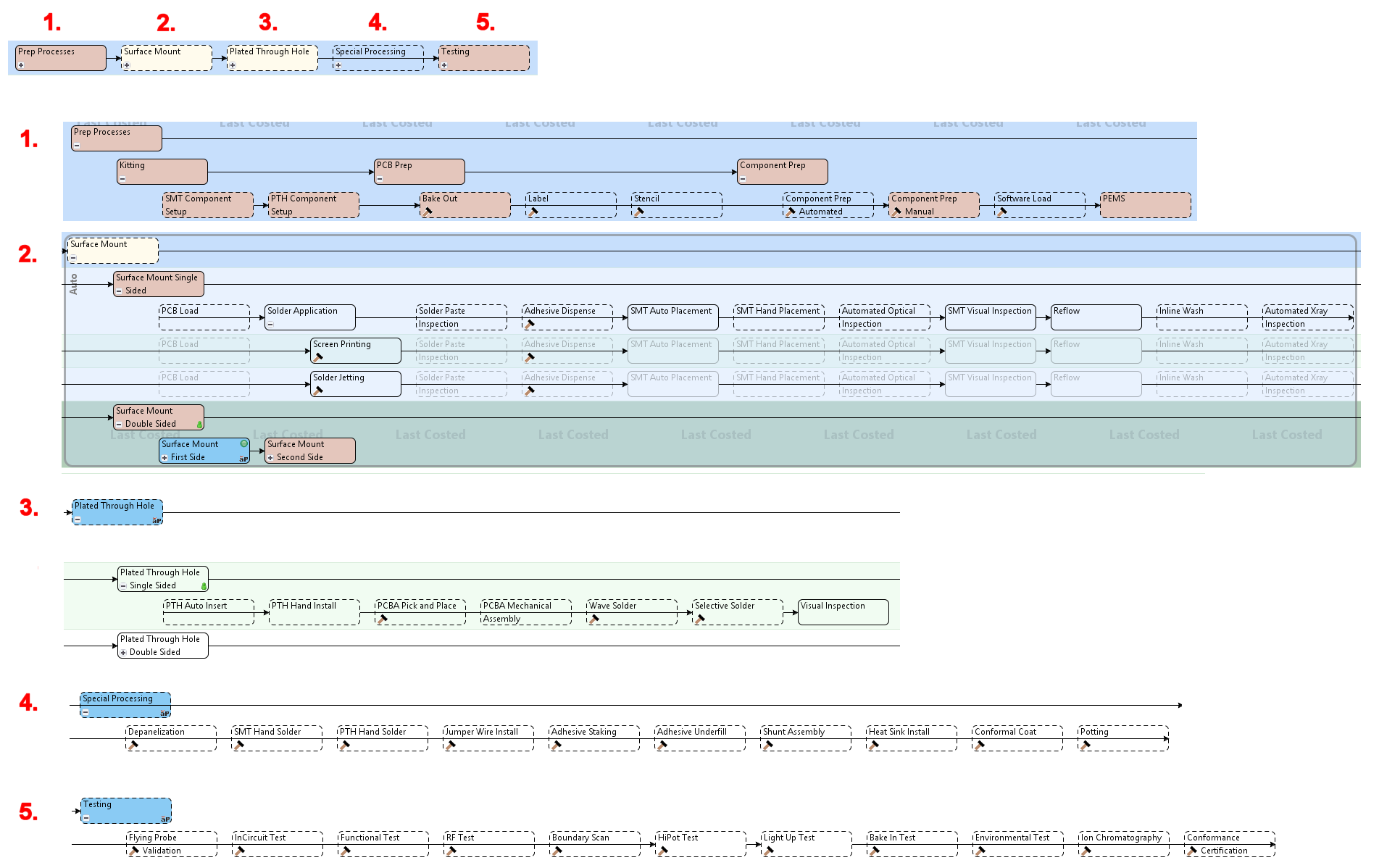
The Assembly Process Group routings for PCBA are summarized in the following illustration. The text is small, so the illustration is followed by a listing of the processes shown. (You can always display the full routing diagram in the aPriori client by clicking Edit > Routing Selection in the Manufacturing Process pane, and ensuring that View > Show Uncosted Nodes within Visible Routings is selected in the Routing Selection window.)
-
Prep Processes -- Surface Mount Technology (SMT) Component Setup, Plated Through Hole (PTH) Component Setup, Bake Out, Label, Stencil, Automated Component Prep Automated, Manual Component Prep, Component Software Load, PEMS/MSDS
-
Surface Mount -- (single and double sided) - PCB Load, PCB Flip, Screen Printing, Solder Jetting, Solder Paste Inspection, Adhesive Dispense, SMT Auto Placement, SMT Hand Placement, Automated Optical Inspection, SMT Visual Inspection, Reflow, Inline Wash, Automated Xray Inspection
-
Plated Through Hole -- PTH Auto Insert, PTH Hand Install, Wave Solder, Selective Solder, Visual Inspection
-
Special Processing --Depanelization, SMT Hand Solder, PTH Hand Solder, Jumper Wire Install, Adhesive Stake, Adhesive Underfill, Shunt Assembly, Heat Sink Install, Batch Wash, Conformal Coat, Potting, Final Assy
-
Testing -- Flying Probe Validation, InCircuit Test, Software Load, Functional Test, RF Test, Boundary Scan (JTAG), HiPot Test, Light Up Test, Bake In/Burn In Test, Environmental Test, Ion Chromatography, Conformance Certification
PCBA Costing Requirements
To cost a PCBA, aPriori requires these inputs:
-
A Bill of Materials (BOM) spreadsheet from your PCBA design tool in a standardized, .csv format.
-
Standard prices for purchased components. You can provide the pricing data as part of the BOM file if you obtain it from the aPriori Electronics Data Collection service or collect it independently. Alternatively, you can provide the pricing data in the form of a Component Library that maps your Customer Part Numbers to Manufacturer Part Numbers.
If you choose to provide the data in the form of a Component Library, work with aPriori Professional Services to develop the initial configuration. After the initial construction, an aPriori administrator at your company must maintain your Component Library.
-
User inputs in the form of values provided via the PCBA Costing dialog box that appears when you click the PCBA button (or later as individual PSO settings).

PCBA Costing Workflow Diagram
The diagram provides a high-level view of the PCBA costing workflow:

aPriori does not make any assumptions about which specific PCBA design tool is being used. The one assumption that we do make is that the tool can output a BOM spreadsheet file to a .csv table format that you can modify. aPriori imports this spreadsheet with the aPriori BOM loader.